Apex PDF Generation in Salesforce has historically been a bit of a workaround. For years, developers had to create a Visualforce page, set the renderAs=”pdf” attribute, and then call PageReference.getContentAsPDF() in Apex.
With the Spring ’26 release, Salesforce has streamlined this process by introducing the native Blob.toPdf() method. This allows developers to convert HTML strings directly into PDF Blobs without the overhead of extra Visualforce pages.
What is the Blob.toPdf() Method?
The Blob.toPdf() method is a static Apex method that takes an HTML string (or Blob) and processes it through the Visualforce PDF Rendering Service.
Key Benefits:
- No Visualforce Pages Needed: Generate PDFs entirely within an Apex Class, Trigger, or Anonymous block.
- Consistency: It uses the same engine as Visualforce, ensuring that if it works in a .page, it works in Blob.toPdf().
How it Works:
The method accepts a string of HTML and returns a Blob. This Blob can then be saved as a ContentVersion (File), sent as an email attachment, or passed to an external API.
// Simple Example
String htmlBody = '<html><body><h1>Invoice #123</h1><p>Amount: $500.00</p></body></html>';
Blob pdfBlob = Blob.toPdf(htmlBody);
Important Note: Starting in Summer ’26, Salesforce will enforce the use of the Visualforce PDF Rendering Service for all Blob.toPdf() calls. A major change to watch for is the default font, which changes from Serif to Sans-Serif.
Examples:
- Generating a Branded PDF and Saving as a File
In this example, we generate a PDF using CSS for styling and attach it to a specific Record (e.g., an Account or Opportunity).
public class AccountReportGenerator {
    public static void generateAccountPdf(Id accountId) {
        Account acc = [SELECT Name, Industry, Phone, Website,
                      (SELECT Name, Email, Title FROM Contacts)
                      FROM Account WHERE Id = :accountId LIMIT 1];

        String htmlBody = '<html><body>';
        htmlBody += '<table width="100%" border="0" cellspacing="0" cellpadding="10" style="font-family: sans-serif;">';
        htmlBody += '  <tr bgcolor="#00A1E0">';
        htmlBody += '    <td><h1 style="color: white; margin:0;">Account Report</h1></td>';
        htmlBody += '  </tr>';
        htmlBody += '</table>';
        htmlBody += '<div style="font-family: sans-serif; margin-top: 20px;">';
        htmlBody += '  <h3>Account Information</h3>';
        htmlBody += '  <p><b>Name:</b> ' + acc.Name + '</p>';
        htmlBody += '  <p><b>Industry:</b> ' + (acc.Industry != null ? acc.Industry : 'N/A') + '</p>';
        htmlBody += '  <p><b>Website:</b> ' + (acc.Website != null ? acc.Website : 'N/A') + '</p>';
        htmlBody += '</div>';
        htmlBody += '<br/>';
        htmlBody += '<h3 style="font-family: sans-serif; margin-bottom: 5px;">Related Contacts</h3>';
        htmlBody += '<br/>';
        htmlBody += '<table width="100%" border="1" cellpadding="5" cellspacing="0" style="font-family: sans-serif; border-collapse: collapse; margin-top: 15px;">';
        htmlBody += '  <tr bgcolor="#f2f2f2"><th>Name</th><th>Title</th><th>Email</th></tr>';

        if(!acc.Contacts.isEmpty()) {
            for(Contact con : acc.Contacts) {
                htmlBody += '<tr>';
                htmlBody += '  <td>' + con.Name + '</td>';
                htmlBody += '  <td>' + (con.Title != null ? con.Title : '-') + '</td>';
                htmlBody += '  <td>' + (con.Email != null ? con.Email : '-') + '</td>';
                htmlBody += '</tr>';
            }
        } else {
            htmlBody += '<tr><td colspan="3" align="center">No contacts found.</td></tr>';
        }

        htmlBody += '</table>';
        htmlBody += '</body></html>';

        Blob pdfBlob = Blob.toPdf(htmlBody);

        ContentVersion cv = new ContentVersion();
        cv.Title = acc.Name + '_Report.pdf';
        cv.PathOnClient = acc.Name + '_Report.pdf';
        cv.VersionData = pdfBlob;
        cv.FirstPublishLocationId = accountId;
        insert cv;
    }
}
How to Test it in Developer Console:
// Replace with a valid Account ID from your org
Id myAccountId = ‘001XXXXXXXXXXXXXXX’;
AccountReportGenerator.generateAccountPdf(myAccountId);
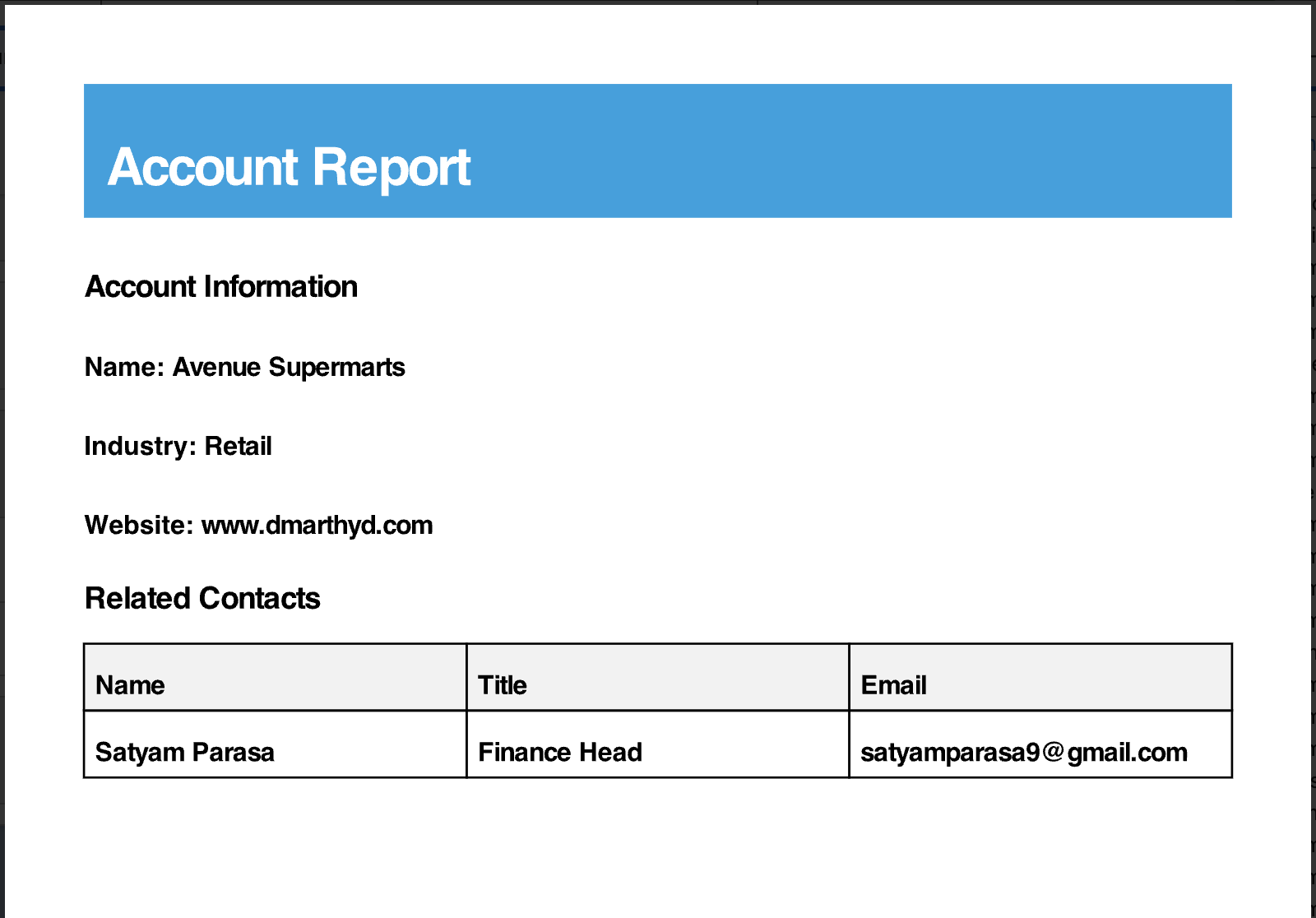
Output Screenshot:
When this method is executed from the Anonymous Window, a new PDF file is generated and automatically attached to the specified Account record.

Conclusion:
The introduction of the native Blob.toPdf() method in the Spring ’26 release represents a significant leap forward for Salesforce developers. By moving away from the “workaround” of hidden Visualforce pages, you can now generate high-quality, data-driven documents entirely within Apex with less complexity and better performance.
For more details follow the link

